Emphorlog Trace
User agent
The user agent configuration is applied to the field details.user_agent.user_agent and must include the properties (optional):
-
os
-
device
-
original
These properties will be added to the from.user_agent field.
This will generate individual fields containing the operating system, device type, and their versions.
GeoIP
See section:
https://opencde.atlassian.net/wiki/spaces/VM/pages/32800769/Dashboard+Kibana#📍-🌎--GeoIP-Plugin
to keep the geolocation databases updated.
Path
<![CDATA[/usr/share/elasticsearch/modules/ingest-geoip]]>
Servers
Data ingestion servers:
xxx-elkspeg-0002/3
The IP is previously set in a plain text field using a Set processor on the field:
<![CDATA[from.ip_txt]]>
Afterwards, a script is executed to transform this IP into geolocation data, such as latitude, longitude, region name, etc.
<![CDATA[def extractIP(def input) {
    return input.replace('[','').replace(']','');
}

// Check if the 'campo_con_texto' field exists and is not null
if (ctx.from.containsKey('ip_txt') && ctx.from.ip_txt != null) {
    ctx.from.ip =  extractIP(ctx.from.ip_txt);
} else {
    ctx.from.ip =  null;
}]]>
Afterwards, a GeoIP processor will be added from the field from.ip to the target field from.geoip, which must include the following properties:
-
region_iso_code
-
region_name
-
city_name
-
country_name
-
location
This will allow maps to be configured in the dashboards.
Generic processed component templates
Path:
Stack Management -> Index Management -> Component Templates -> Create component template
A component template is created with the generic mapping for the documents received from emphorlog so they are stored with the processed data:
<![CDATA[emphorlog_v2_mapping]]>
Mapping
A field of type Date is created:
<![CDATA[@timestamp]]>
The following fields of type Object are created:
-
data_stream
-
details
-
from
- It is important to add here a geoip field of type object containing a location field of type geo-point
-
outcome
The following fields of type Keyword are created:
-
event_code
-
id
-
resourceType
It is necessary to keep Enable dynamic mapping enabled in the Advanced options of Mappings (optional) section, as well as the default Map date strings as dates option.
Generic processed index template
Path:
Stack Management -> Index Management -> Index Template -> Create template
Creation of emphorlog_v2_noproject
It is necessary to enable the Create data stream option.
Component templates (optional)
Add the previously created component template:
<![CDATA[emphorlog_v2_mapping]]>
Index settings
<![CDATA[{
  "index": {
    "lifecycle": {
      "name": "emphorlog_v2_policy",
      "rollover_alias": "emphorlog_v2_noproject"
    },
    "default_pipeline": "emphorlog_v2_pipeline"
  }
}]]>
Mapping
Create a field called data_stream of type object with a field origin of type Constant keyword and value:
<![CDATA[noproject]]>
It is necessary to keep Enable dynamic mapping enabled in the Advanced options of Mappings (optional) section, as well as the default Map date strings as dates option.
Specific configurations
Enrich processor
An enrich processor is created to enrich incoming documents. This improves incoming data by using more understandable language when dealing with large volumes of data, for example, replacing codes with their actual meanings.
Pipelines can only execute one enrich processor per parent field. That is, if within additional information there are two fields that we want to enrich, the pipeline will only enrich the last one.
How enrich processors work
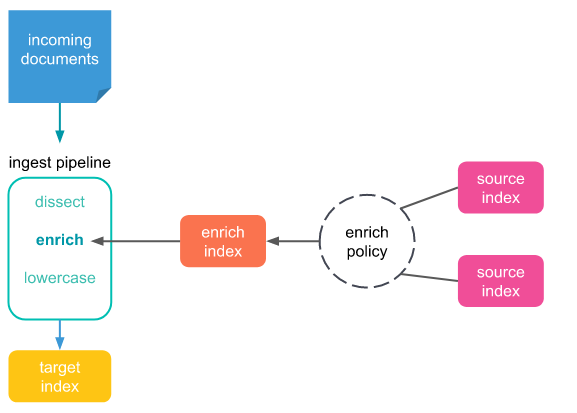
Index containing the information ("Database")
An index called enrich_emphorlog_v2_index will be created and will work as a "database", where the original input value and the new value to be displayed will be specified.
<![CDATA[POST /enrich_emphorlog_v2_index/_doc
{
  "informacionAdicional": {
    "Diplos-Concello": "VILARIÑO DE CONSO"
  },
  "Diplos-Concello": "32092"
}]]>
Enrich processor policy
An enrich processor policy is created where the fields to be enriched are specified:
emphorlog_enrich_policy-concello
<![CDATA[PUT /_enrich/policy/emphorlog_enrich_policy-concello
{
  "match": {
    "indices": "enrich_emphorlog_v2_index",
    "match_field": "Diplos-Concello",
    "enrich_fields": ["informacionAdicional.Diplos-Concello"]
  }
}]]>
Execute the policy
It is necessary to execute the created policy in order to create the subsequent pipeline.
<![CDATA[POST /_enrich/policy/emphorlog_enrich_policy-concello/_execute]]>
Pipeline with the enriching policy
A pipeline is created to execute the enriching policy when the data enters the system to be indexed with the new information:
emphorlog_enrich_pipeline-concello
<![CDATA[PUT /_ingest/pipeline/emphorlog_enrich_pipeline-concello
{
  "processors": [
    {
      "enrich": {
        "policy_name": "emphorlog_enrich_policy-concello",
        "field": "details.informacionAdicional.Diplos-Concello",
        "target_field": "target-concello",
        "max_matches": "1",
        "ignore_missing": true
      }
    },
    {
      "remove": {
        "field": "target-concello.Diplos-Concello",
        "ignore_missing": true
      }
    }
  ]
}]]>
Specific pipeline
Path:
Stack Management -> Ingest Pipeline -> Create pipeline
A project-specific pipeline is created:
emphorlog_v2_diplos-pipeline
This pipeline will include the common pipeline emphorlog_v2_pipeline and the necessary processors to collect the data that should be stored for each project.
In the case of Diplos, several scripts are created to enrich the data.
Enrichment script
<![CDATA[def codigo_modalidad_map = [
  "010": "Presencial",
  "006": "Teleformación",
  "diplos-mixt": "Mixta"
];

def codigos = ctx.containsKey("details") &&
              ctx["details"].containsKey("informacionAdicional") &&
              ctx["details"]["informacionAdicional"].containsKey("Diplos-Modalidad") ?
              ctx["details"]["informacionAdicional"]["Diplos-Modalidad"].splitOnToken(',') : [];

def modalidades = [];

for (def codigo : codigos) {
  def titulo = codigo_modalidad_map.get(codigo.trim());
  if (titulo != null) {
    modalidades.add(titulo);
  }
}

if (modalidades.size() > 0) {
  ctx["details"]["informacionAdicional"]["Diplos-Modalidad"] = modalidades;
}]]>
Processors
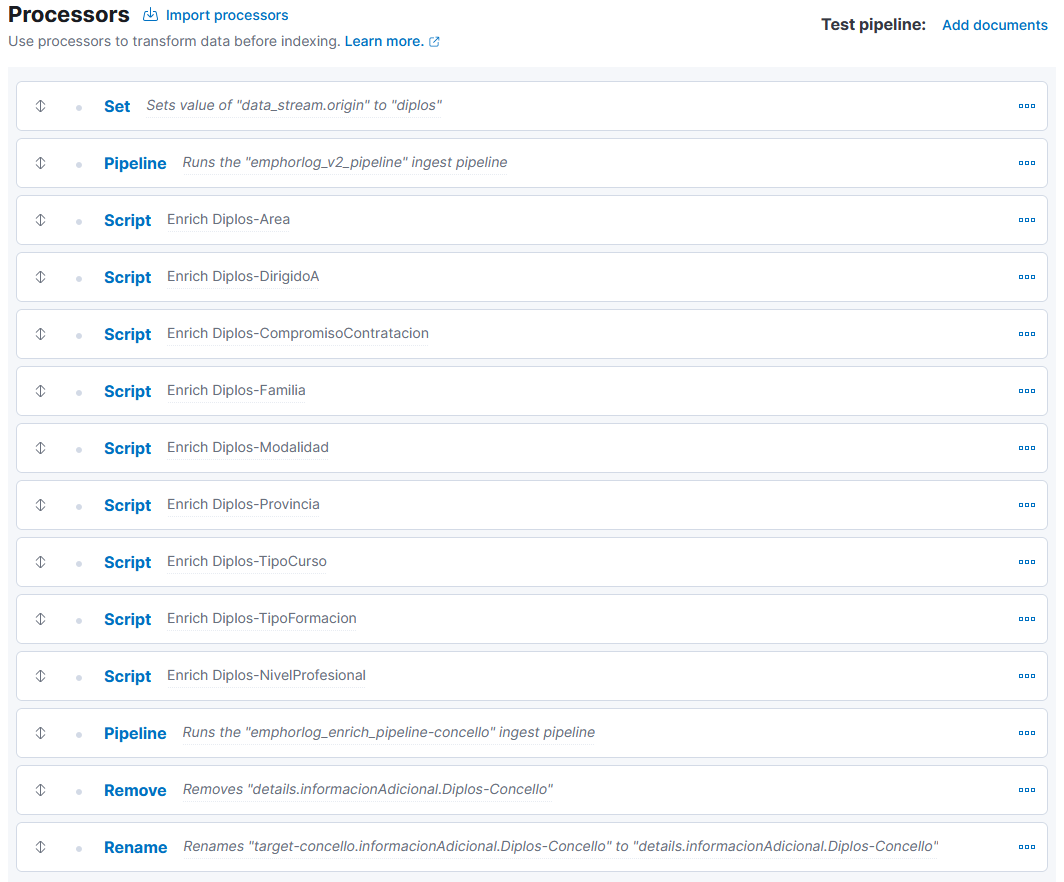
The pipeline with the Enrich processor emphorlog_enrich_pipeline-concello will be added to the specific pipeline emphorlog_v2_diplos-pipeline with:
A Remove processor for the field details.informacionAdicional.Diplos-Concello.
A Rename processor from the field target-concello.informacionAdicional.Diplos-Concello to the target field details.informacionAdicional.Diplos-Concello.
Specific Component Templates
Stack Management -> Index Management -> Component Templates -> Create component template
A component template will be created with the specific mapping for the documents received from emphorlog so they are stored with the processed data: emphorlog_v2_diplos-mapping
Mapping
An Object type field will be created:
details
With a subfield of type Object:
informacionAdicional
With the required subfields per project (these fields include a copy_to: search_details):
-
Diplos-Area: Keyword -
Diplos-CajaBusuqeda: Keyword
A Keyword type field called search_details will be created:
This field is used as a tag for the other fields to simplify searches, allowing searches such as, for example, search_details: Lugo Presencial
It is necessary to keep Enable dynamic mapping enabled in the Advanced options of Mappings (optional) and leave Map date strings as dates enabled by default.
Specific Index Template
Stack Management -> Index Management -> Index Template -> Create template
Creation of emphorlog_v2_<project>
It is necessary to enable the Create data stream option.
Component templates (optional)
The previously created component templates are added: emphorlog_v2_mapping and emphorlog_v2_diplos-mapping
Index settings
<![CDATA[{
  "index": {
    "lifecycle": {
      "name": "emphorlog_v2_policy",
      "rollover_alias": "emphorlog_v2_diplos"
    },
    "default_pipeline": "emphorlog_v2_diplos-pipeline"
  }
}
]]>
Mapping
A field called data_stream of type object is created with a field origin of type constant_keyword and value Diplos.
It is necessary to keep Enable dynamic mapping disabled in the Advanced options of Mappings (optional).
Index Pattern
Stack Management -> Index patterns -> Create index pattern
An index pattern is created for each index to allow data visualization in Discover:
-
emphorlog_v2_* -
emphorlog_v2_noproject* -
emphorlog_v2_diplos* -
emphorlog_v2_<project>*
A raw index pattern should not be created, since these indices are stored for possible migrations or error recovery purposes, with the goal of preserving the original unprocessed data.
Presentation delivered at CIXTEC on October 27 in Santiago de Compostela.