Installation Guide
ABOUT VICO OPEN MODELING
Vico Open Modeling is a technical architect organization focused on service integration systems design and implementation. It provides expertise in building scalable and efficient integration solutions. As an active contributor in the OpenESB ecosystem, Vico Open Modeling is recognised as a key actor in the integration landscape. To meet its customers' requirements, Vico Open Modeling develops and supports OpenESB Enterprise Edition implementations, incorporating enterprise features such as Horizontal Scalability, Monitoring, IoT integration, Big Data access, and professional technical support.
Vico Open Modeling operates in Europe with presence across multiple regions.
Copyright
Copyright © 2018-2026, Vico Open Modeling. All rights reserved. No part of this publication may be copied or distributed, transmitted, transcribed, stored in a retrieval system, or translated into any human or computer language, in any form or by any means, electronic, mechanical, magnetic, manual, optical, chemical or otherwise; or disclosed to third parties without the express written permission of Vico Open Modeling.
Disclaimer
Information in this document is subject to change without notice and does not represent a commitment on the part of Vico Open Modeling. This manual is provided "as is" and Vico Open Modeling disclaims all warranties of any kind concerning third-party content, products, and services. Vico Open Modeling is not responsible for any loss, costs, or damages incurred due to your access to or use of third-party content, products, or services.
1 Introduction
OpenESB Enterprise Edition developed by Pymma is the based on the OpenESB community Edition. OpenESB Enterprise Edition (OE EE) offers the lightest and the most efficient integration tools on the market. Powerful, prompt, scalable with a very low memory footprint, OE EE is ready for virtualisation and cloud deployment.
1.1 OpenESB's history
Sun Microsystems developed initially developed OpenESB by in the late 00's. OpenESB' first versions ran in the Glassfish Application Server. At that time, OpenESB was an open source subset of a Sun's product named Java CAPS. In 2010, Oracle bought Sun Microsystems and stopped its investment on OpenESB which compete with Oracle SOA Suite. For this reason, many of OpenESB documentations rely on Java CAPS under the Oracle trademark. At the same time, a community has been created to support, maintain and improve the pro
Efficient and reliable, this JEE architecture was not accurate anymore with the new agile and scalable architectures based on the cloud and the virtualisation.
In the mid 10's architecture and development were not focused on JEE. Cloud and virtualisation required more flexibility to be efficient in the new environments. The OpenESB community and the main sponsors decided to stop the development of the OpenESB Glassfish Edition.
In 2015, the OpenESB community extracted OpenESB from the application server and issued the OpenESB Edition. OpenESB Standalone Edition (also named Community Edition) offers a light and efficient integration tools. Powerful, prompt, scalable with a very low memory footprint, OE SE is ready for virtualisation and cloud deployment.
In 2016, Pymma issued OpenESB Enterprise Edition (EE) to offer to the enterprise projects, additional features and professional support.
This documentation is dedicated to the OpenESB Enterprise Edition.
1.2 Compatibility with OpenESB Community Edition
OpenESB Enterprise Edition is compatible with the OpenESB Community Edition 3.x. The applications running on OpenESB Version 2.x must be tested before running on production with OpenESB Enterprise Edition.
1.3 OpenESB V3.0 Enterprise Edition content
OE EE has three main parts.
-
OpenESB studio
-
OpenESB instance & Web Admin Console
-
OpenESB components
Additional enterprise component such as Listeners, Publisher or cache driver must be added regarding the application requirement.
1.3.1 OpenESB Studio
OpenESB EE studio V3.x is an Integrated Development Environment based on NetBeans that contains NetBeans regular Java and Java Enterprise tools used to develop application Java projects, as well as many plugins dedicated to OpenESB, designed to develop service-oriented integration projects. The plugins deal with:
-
XML document
-
Schema XML documents
-
WSDL document
-
BPEL document
-
Composite application
-
Intelligent Event processes
-
Many other components.
OpenESB Studio contains all the features required by development teams
- Powerful editors
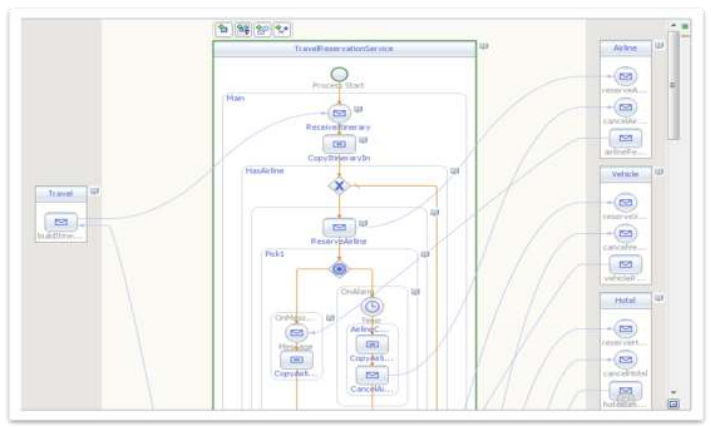
Example of OE plugin: OpenESB BPEL Editor
-
Mapper
-
Debuggers
-
Profilers
-
Refactoring
-
…
OE Studio could be connected directly with one or more instances of OpenESB Enterprise Edition and allows the user to deploy, control and test her/his OE applications without any additional tools.
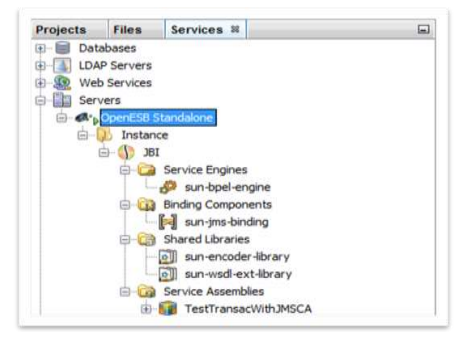
OE Studio Connection to OE SE instance
1.3.2 OpenESB Instance
OpenESB instance is the core part of OpenESB. It is the place where applications and components are deployed and run. Unlike OpenESB legacy edition, OpenESB instance does not require any additional software or containers to start and run in a simple JVM.
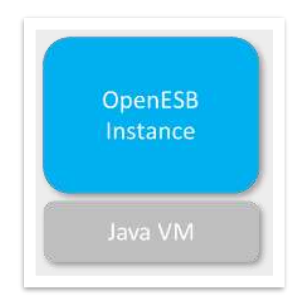
OpenESB stack
1.3.3 OpenESB Web admin console
Light and very smart, OpenESB web console offers the same administrative features that the legacy one. You can easily install libraries, components, deploy services assemblies with your browser chrome, Firefox.
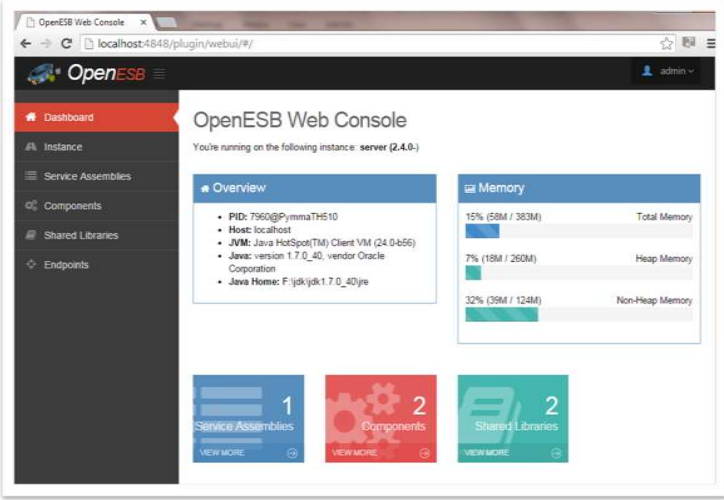
OpenESB Web admin console
More information on the admin console in our document 770-003: OpenESB Web Admin Console.
1.3.4 Components
There are components or libraries are available with OpenESB SE some of them are supported by the community, some by tiers parties such as Pymma. Pymma optimises the components on the OpenESB Enterprise Edition and offers new components (ex: Kafka, MQTT…).
The document 770-002 OE SE Hello World, 770-003 OE Admin Guide details how to deploy a component or a library" please in OpenESB Enterprise Edition.
1.4 JDK Supported version
OpenESB Enterprise Edition has been tested with Java 1.8.151 64 bits. We strongly recommend you run OE SE in a 64 bits mode for scalability purposes.
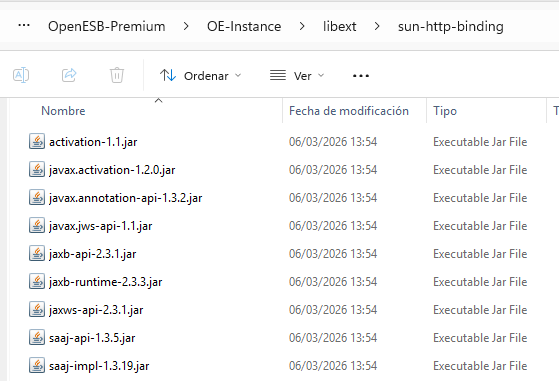
We tested with JDK 11 LTS and it works, but it's important to note that during the installation process you need to add the JAR files (which are no longer included by default in Java 11) into libext/sun-http-binding so that the HTTP binding component can function correctly.
1.5 Supported Operating systems
The OpenESB Enterprise Edition has been tested successfully with the JVM 1.8-151 64 Bit
| Operating System | Recommended |
|---|---|
| Ubuntu | JVM 1.8-151 64 Bit |
| CentOS | JVM 1.8-151 64 Bit |
| RedHat | JVM 1.8-151 64 Bit |
| Solaris | JVM 1.8-151 64 Bit |
| Windows 64 bits | JVM 1.8-151 64 Bit |
| Windows Server | JVM 1.8-151 64 Bit |
We recommend you use the Oracle JDK 1.8.151 to run OE SE.
1.6 Memory requirement
OpenESB running on a Raspberry PI with 235 Mb of memory
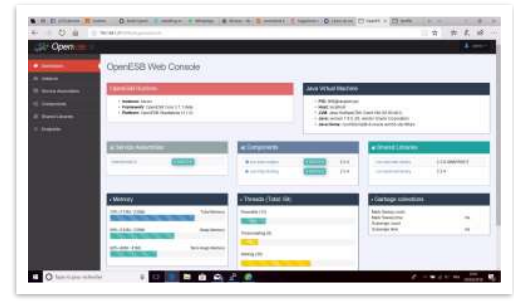
OpenESB Enterprise Edition runs on many platforms from the raspberry PI up to AWS cloud. The amount of memory is depending on the application and invocation number running on OpenESB. On production, Pymma advises its customers to run instances with 4 to 8 Go of memory. If more memory is required, create new instances
1.7 External software and applications supported
Through its connectors, OpenESB communicates with many external applications and products. Please find below a short list of database and message queuing systems compatible with OpenESB. The list is not exhaustive; if you do not see your product on the list, it does not mean it is incompatible with OpenESB but rather that we have not tested it yet. Please contact us for further information on OpenESB compatibility.
1.7.1 SQL Databases
We test OpenESB with the last version of:
| Database | Editor |
|---|---|
| Oracle | Oracle |
| MySQL | Oracle |
| PostgreSQL | The PostgreSQL Development Group |
| Derby | Apache Group |
| Java DB | Oracle |
| PostgreSQL 9.x | PostgreSQL |
| SQL Server | Microsoft |
| Sybase DB | SAP |
| DB2 | IBM |
| Many Other Databases with JDBC support | See: OpenESB Enterprise Edition JNDI Support |
1.7.2 Message Queuing Systems
| JMS Broker | Editor |
|---|---|
| WebSphere MQ | IBM |
| OpenMQ | Oracle |
| ActiveMQ | Apache |
| HornetMQ | JBoss |
| All JMS Compliant brokers | See: OpenESB JMS Connection |
JMS provider drivers required by the JMS Binding Component must also be placed in the server's libext directory.
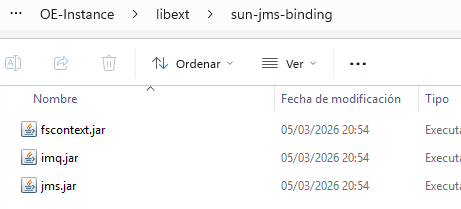
This ensures that the JMS Binding Component can properly load and use the necessary client libraries to establish connections with the JMS provider at runtime.
1.7.3 XSLT 2.0 support in the BPEL Engine
To enable XSLT 2.0 support in the BPEL Engine, it is necessary to add additional configuration files to the server.
Specifically, the required libraries (such as the Saxon JAR files) must be placed in the libext directory of the application server. This ensures that the BPEL Engine can access an XSLT 2.0–compliant processor at runtime.
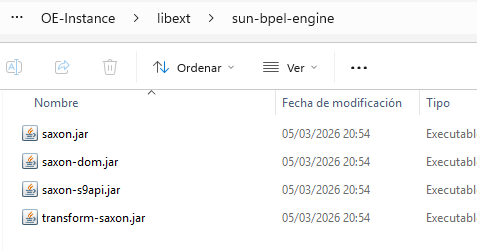
After adding the files, the server must be restarted so that the new libraries are loaded properly.
2 Hardware requirements
2.1 Hardware requirements at the design time
When designing, developers tend to run their IDE and OpenESB instances on the same machine. Sophisticated configurations allow them to share the same instances of OE SE and work together on larger units of development.
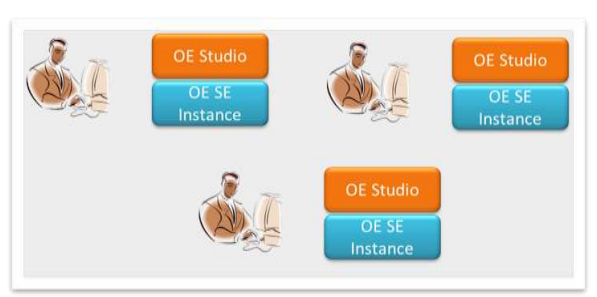
One OE Instance per developer
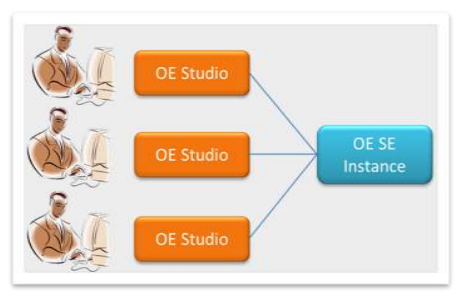
Share OE SE instance(s)
In both cases, machines used for the development must be set up with enough power and memory to work comfortably. OE Studio runs on any decent machine with 4 GB. However, if you would like to improve your productivity, we recommend you use an 8 GB machine with 17 inches screen.
OpenESB requires at least 2 GB free space disk to be installed: 60% for the studio, 35% for the components and 5% for the OpenESB instance. We recommend you dedicate 10 GB to OE SE.
2.2 Hardware requirements at the runtime
OpenESB Enterprise Edition is a very light java process, which can run with limited resources; it can run on a simple Raspberry PI system designed for embedded applications for cars, robots and industrial machines. Nevertheless, OE SE has been designed to process billions of messages every day, and the performance you obtain is proportional to the hardware resource you dedicate to your projects. The feedback received from our customers who are using OpenESB as infrastructures for their SOA projects shows that OpenESB consumes very few CPU but requires enough memory to run properly. At the start, OpenESB takes up all the memory available on the machine and then manages it to process messages most efficiently. So, if you dedicate x GB of memory to an OpenESB instance, x GB are used when starting OpenESB whatever the activity.
OE configurations with 2 GB can process millions of messages per day. We recommend you set up your JVM memory between 2-4 GB for your first tests and QA. For the benchmark and production configuration, set up your JVM between 4 and 8 GB. If more memory is needed, create additional OpenESB instances and run your project in multi-instances configurations.
Some large projects deploy tens of OpenESB instance running concurrently and reach billions of processes daily.
For further information, see our documents: 770-010 OpenESB optimisation and 770-008 OpenESB Multi-instance mode.
3 OpenESB Enterprise Edition Installation
As the application server does not require any more, OE SE installation is easier and faster than the previous legacy versions of OpenESB.
3.1 Install Java JDK
Install on your machine a JDK compliant with your OpenESB then set up the environment variable JAVA_HOME.
3.2 Download OpenESB
OpenESB Enterprise Edition can be downloaded on demand (www.pymma.com) and the OpenESB Community Edition directly downloaded from the Pymma website or the community website (www.open-esb.net).
3.3 Install OpenESB
Unzip the OpenESB-QuickStart-Enterprise-x.x.zip in a convenient place on your disk (in this document we choose "F:\" on a windows system). After unzipping the file, it contains 3 main subdirectories OE-Components, OE-Instance and OEStudio. Congratulation! OpenESB is now installed on your machine.
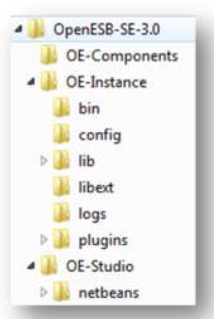
Please note some noticeable directories:
| Directory | Description |
|---|---|
| …/OE-Instance/bin | Batch or shell files to start OE SE |
| …/OE-Studio/NetBeans | NetBeans installation |
| …/OEStudio/NetBeans/bin | File to start OE-studio |
| …/OE-Instance/libext | Copy your external libraries here and start OE SE. Your libraries will be added to the OE SE classpath |
| …/OE-Instance/logs | OE SE logs can be found here |
/OE-Instance/libext is used to add external libraries to the classpath of the relevant OpenESB component or service engine; I would not describe it as a global runtime classpath unless the specific path and component documentation explicitly say so.
3.4 Test your installation
Open a console and go to the directory …/OE-Studio/bin and start OpenESB.bat on Windows or OpenESB.sh on Linux/Unix systems.
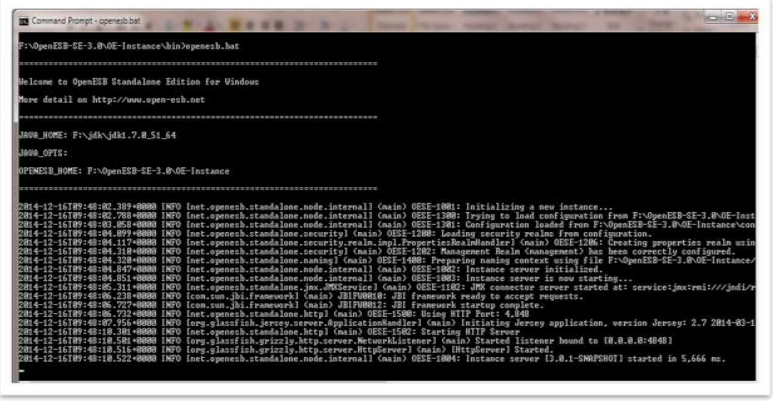
OpenESB SE starts in few seconds.
From now, OpenESB is ready to run.
4 Test OpenESB Web admin console
The next step is to test OE Web admin console. As explained above, the web console replaces the Glassfish admin console and supports all the admin command to manage components, libraries and service assemblies.
Pymma tested successfully the OpenESB console with Chrome, Firefox, Opera and Safari browsers. Edge and Internet Explorer do not offer the same reliability.
In your browser type:
http://localhost:4848/webui/
After a few seconds, the login screen appears:
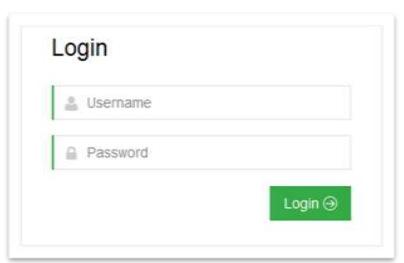
By default, the login and password are "admin" and "admin".
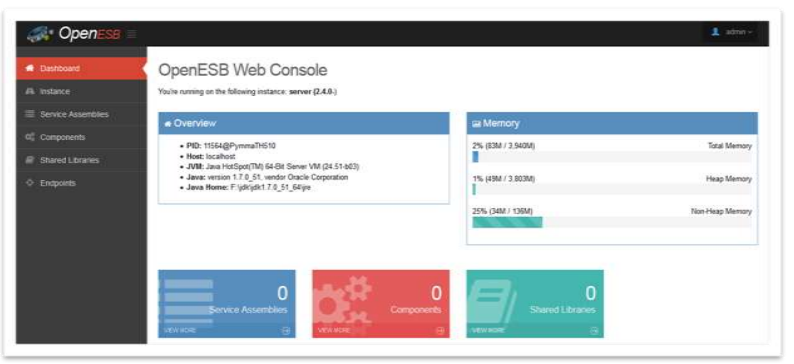
OE Web admin console
OE web admin console is ready and can be used to install the components and deploy your projects.
For more information on the console, please have a look at our document: 770-003 OE Web admin console.
5 OE Studio
To start OE studio, run the executable file OpenESB.exe (for windows) or OpenESB (for Linux/Unix) found in the directory ${OpenESB}\OE-Studio\Netbeans\bin.
After a few seconds, the splash OpenESB appears. Regarding the number and the size of the projects you manage with OpenESB Studio, it needs from a few seconds to a few minutes to open.
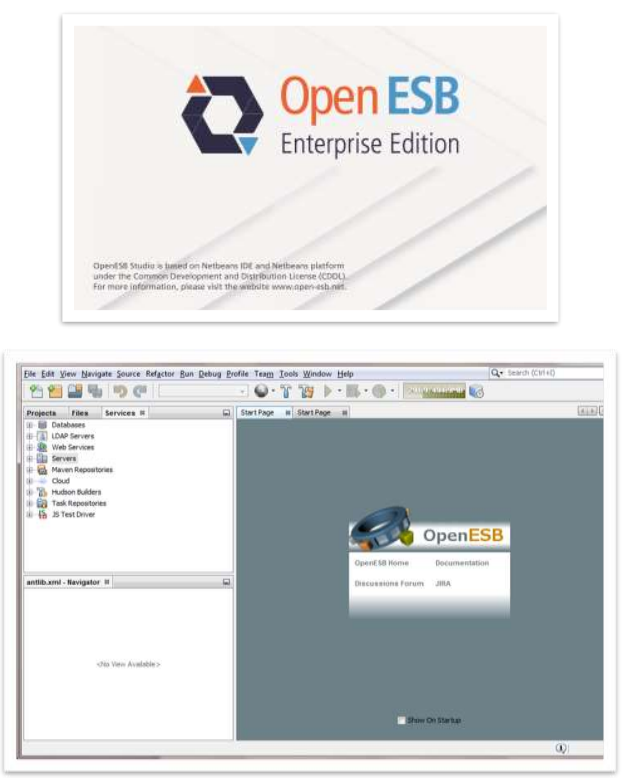
OE Studio home page
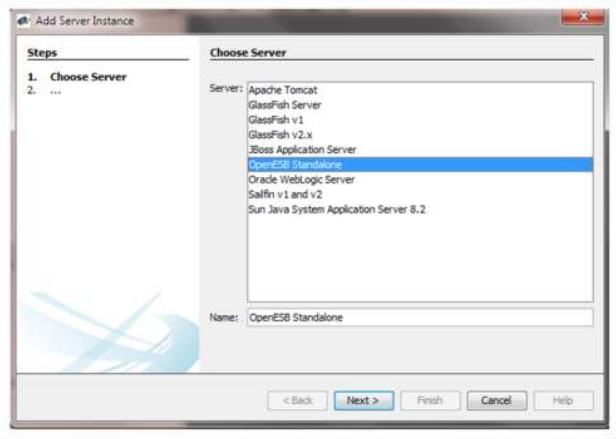
OE-Studio is ready to run. The first task to connect OpenESB Studio with the OpenESB Instance is to define a server setting. On the left side of the screen, select the tab services then Servers. Click right on Servers node and select Add Server.
In the server list, select OpenESB Standalone then click on Next.
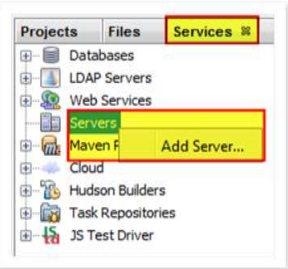
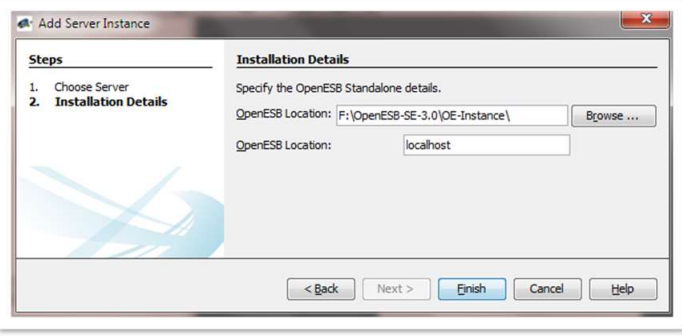
Installation Details
Select in the first OpenESB location the directory where you installed OE-Instance and leave "localhost" as value for the second location. Then click on Finish.
OE Instance hierarchy is now available from OE-Studio. From there, you can install any components, deploy your service assemblies, start and stop them and debug Java and BPEL applications.
We recommend you install the components from the web console since it offers more administration capability than OE-Studio.
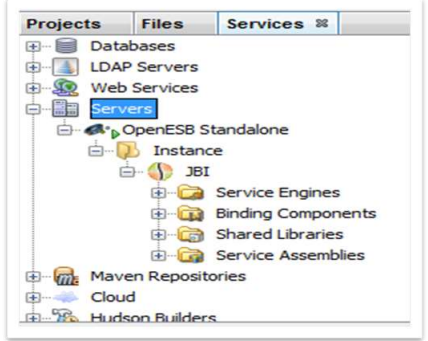
OE Instance hierarchy from OE Studio
6 Next steps
The next step installs the OpenESB components and Libraries on your OpenESB instance then create and deploy your project with OpenESB Studio.
We advise you to read the following document: 770-002 OE Hello World and the administrative guide: 770-002 OE Administrative Guide.
7 Help and support
Pymma is deeply involved in the community and offers services and consulting on OpenESB. Pymma has professional services that can assist you with the development of your service design, implementation and ongoing management. All our skills and background are based on our extensive first-hand experience and industry-leading methods.
Pymma releases an OpenESB Enterprise Edition with many additional enterprise features and professional support.
In addition to OpenESB development, Pymma designed a new service-based development process named Rebecca to help business, architect and development team during the design and the implementation of their service-oriented projects with OpenESB or any other service-based development tool.
Feel free to contact us by email at contact@pymma.com for any further information on our OpenESB Services.