Document and Publish WSDL/XSD in the OpenESB Service Directory
1. Purpose of WSDL/XSD Documentation in the Service Directory
The Service Directory functions as the technical catalog of the OpenESB ecosystem:
-
It centralizes information for services deployed in STG and PRD environments.
-
It enables direct access to technical artifacts:
-
WSDL files
-
XSD schemas
-
Abstract invocation endpoints
-
-
It provides traceability and visibility of system integrations.
WSDL/XSD documentation enables the Service Directory to:
-
Display the purpose and contract of each service.
-
Expose its operations and data types.
-
Generate suitable endpoints automatically.
-
Allow downloading and reuse of artifacts across teams
2. What Documentation the Service Directory Provides
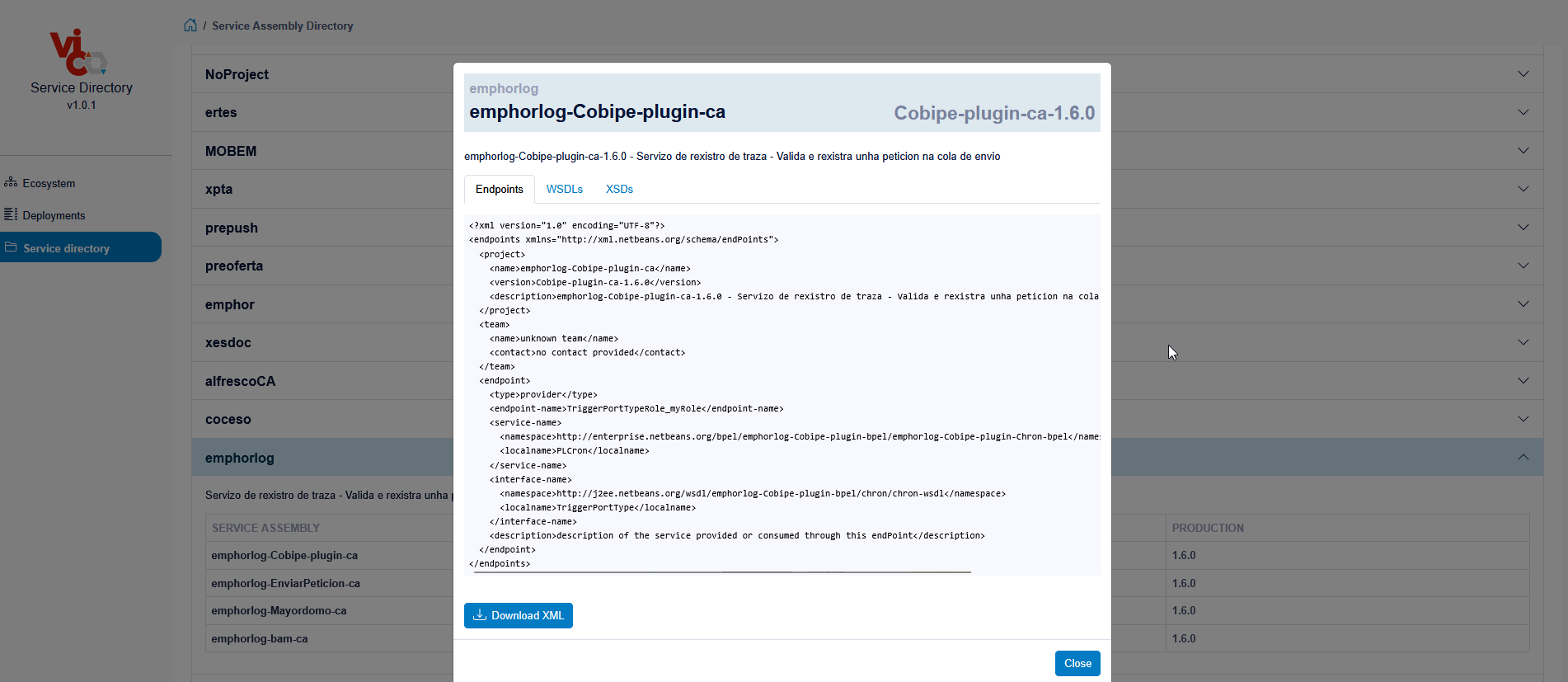
For each documented service, Service Directory offers:
-
A human-readable description of the service.
-
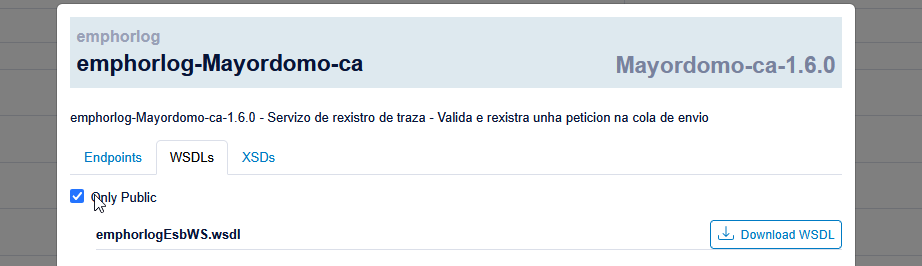
A catalog of WSDL and XSD artifacts associated with it.
-
Abstract invocation endpoints for each environment (e.g. STG / PRD).
-
Direct links to download WSDLs and endpoints.
The information comes from:
-
The main CA project:
-
The
pom.xml(especially the<description>field). -
The artifacts placed under the project's
/public-pathdirectory.
-
The result is a technical catalog where each service is described and its contract (WSDL/XSD) is clearly exposed.
3. Which Services Should Be Documented
Not everything must be documented; the presentation defines clear criteria:
1. Reusable / externally consumed services
-
All Composite Applications (CAs) whose interfaces are consumed by other systems or teams must be documented.
-
These are the services where a clearly defined contract (WSDL/XSD) is critical.
2. Internal services relevant for traceability
-
Even if a service is not strictly "public", it may still be documented if it:
-
Helps understand message flows.
-
Clarifies dependencies between systems.
-
Improves operational visibility.
-
3. Public services under /public-path
-
Any WSDL/XSD intended to be published must live in the
/public-pathdirectory of the main project -
The CA description should make clear:
-
Which part of the contract is public.
-
Which parts are internal or implementation-specific.
-
4. Key best practices
-
Include a short functional description in
pom.xml(<description>). -
Keep WSDLs clean, with clear and consistent filenames.
-
Add
<documentation>tags to:-
Each relevant operation (in WSDL).
-
Important types/elements (in XSD).
-
-
Validate the documentation (WSDL/XSD) before deploying to STG/PRD.
4. Procedure to Document Public Services (WSDL/XSD)
4.1. General steps to publish a service
- Locate the main WSDL of the service
-
Identify the WSDL that acts as the entry point:
-
It defines the main
portType,binding, andservice. -
It represents the public contract you want to expose.
-
- Move the WSDL and its dependent XSD files to
/public-path
-
Copy/move:
-
The main WSDL.
-
All XSD files that it
importorinclude.
-
-
Place them under something like:
src/public-pathaccording to the structure of the CA's main project.
- Review imports and includes
-
Ensure that all:
-
wsdl:import -
xsd:import -
xsd:include
-
-
Use relative paths within
public-path. -
Avoid:
-
Absolute paths like
C:\Users\... -
IDE-specific local paths that won't exist in the server.
-
- Confirm the main WSDL
Verify that the WSDL you mark as "public" is indeed the one that must be exposed:
-
It contains all operations that should be public.
-
It points to the correct
portType. -
It is semantically stable enough to be reused by consumers.
- Validate the service and rebuild the CA
-
Validate the WSDL and XSD in your IDE or build tool.
-
Rebuild the CA so the new layout is packaged correctly.
-
After deployment, Service Directory automatically discovers the WSDL in
/public-pathand adds it to the catalog.
Key idea:
Just by publishing the WSDL under/public-path, the Service Directory can detect it, parse it, and expose it (with endpoints and download links).
5. Re-locating WSDL/XSD Generated From a BPEL
Many OpenESB services are implemented as BPEL processes, which come with their own WSDL and XSD files.
To document them properly:
5.1. Preparation
-
Identify all WSDL/XSD used by the BPEL
-
The BPEL's interface WSDL.
-
The schemas describing input/output messages.
-
-
Move them to
/public-path-
Copy the WSDL/XSD tree into
/public-path, keeping:-
Directory structure.
-
Filenames.
-
-
-
Update references in the
.bpel-
Adjust:
-
importstatements. -
Schema locations.
-
Any WSDL/XSD references in
partnerLinkTypeand variables.
-
-
Ensure they now point to the new relative locations under
public-path.
-
-
Validate the BPEL
-
Build and deploy it again.
-
Run quick tests to ensure the process still works.
-
5.2. Documentation and verification
-
Add notes in the CA descriptor indicating:
-
Which WSDLs have been exposed as public.
-
Which operations form the official contract.
-
-
Add
<documentation>in:-
WSDL operations.
-
Key XSD elements/types.
-
-
Verify:
-
Namespaces remain correct after the move.
-
The Service Directory now lists:
-
The service.
-
The WSDL.
-
The generated abstract endpoints.
-
-
💡 Resultado esperado:
Tras mover los artefactos a/public-pathy reconstruir, los servicios BPEL quedan visibles y documentados en el Service Directory.
6. Notations and Documentation Style in WSDL/XSD
The presentation emphasizes using standard XML documentation elements:
6.1. The <documentation> element
-
In WSDL
Can appear in:-
definitions -
portType -
operation -
message -
etc.
-
-
In XSD
Must go inside:<![CDATA[<annotation>
<documentation>...</documentation>
</annotation>
]]>
Example structure:
<![CDATA[<documentation>
  <p><strong>Service:</strong> Order Management</p>
  <p>Main operation: <em>createOrder</em></p>
  <ul>
    <li>Input: order.xsd</li>
    <li>Output: confirmation.xsd</li>
  </ul>
</documentation>
]]>
6.2. Recommended content
Per service or operation:
-
Short functional description.
-
Reference to input/output schemas.
-
Mention of relevant faults or error conditions.
-
Any usage notes or constraints.
6.3. Style & consistency
-
Use simple HTML (bold, italics, lists) in
<documentation>if needed. -
Maintain a consistent structure across all services/projects.
-
Keep operation and message names aligned with the real functional language used in the organization.
-
Avoid duplicating large chunks of text in multiple places; instead, keep:
-
Technical contract in WSDL/XSD.
-
Extended functional explanations in Confluence.
-
7. Editing and Generating Documentation with IDEs (Oxygen, VS Code, NetBeans, Eclipse)
7.1. Editing the Documentation
Oxygen XML Editor:
-
Provides a tree-based view.
-
Facilitates visual editing of
<documentation>. -
Allows validating WSDL/XSD directly from the IDE.
VS Code / NetBeans / Eclipse:
-
Direct XML editing.
-
Additional plugins can help with previewing and validating.
Best practices:
-
Validate files before committing.
-
Maintain a similar documentation structure across projects.
-
Use a standard comment/documentation format so other developers can easily recognize it.
7.2. Generating HTML Documentation with Oxygen
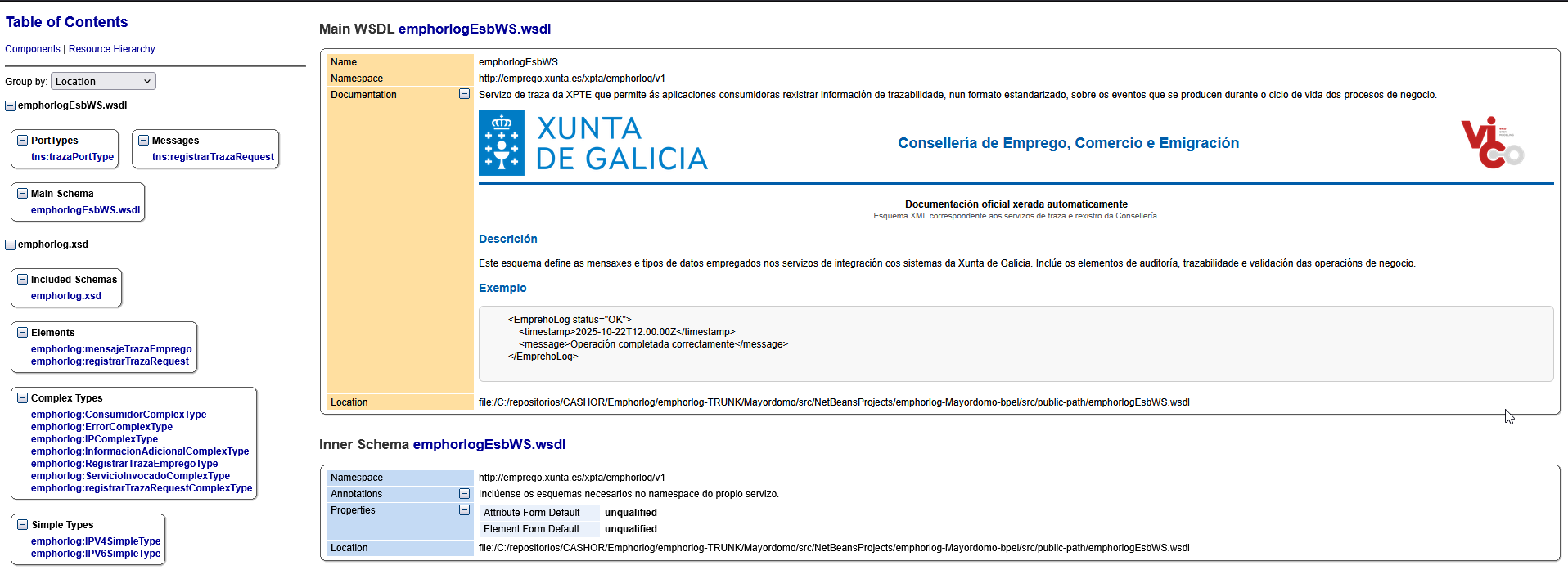
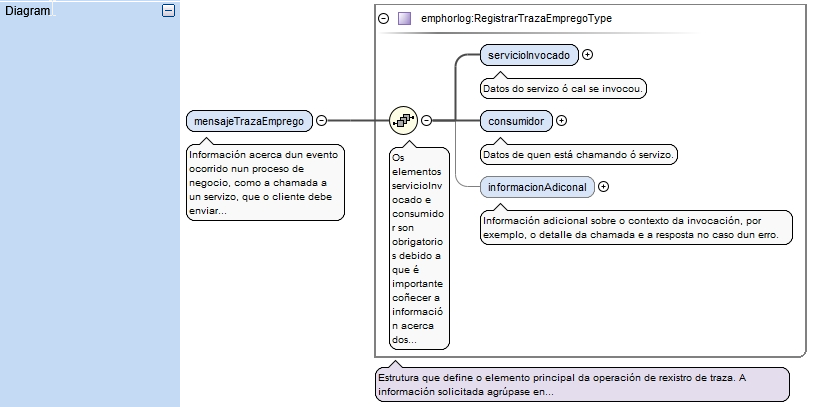
Oxygen can generate complete HTML documentation from a WSDL:
Steps:
-
Open Oxygen (Eclipse plugin or standalone version).
-
Complete/adjust the
<documentation>tags in the WSDL/XSD. -
Validate the WSDL (Document → Validate).
-
Go to:
Tools → Generate Documentation → WSDL Documentation
Configure options:
-
Output format: HTML
-
Include diagrams
-
Include annotations (
<documentation>) -
If using HTML tags inside
<documentation>, uncheck "Escape XML content" in the settings.
Generate and review the result.
(Future) Integrate this HTML documentation directly within the Service Directory for quick access.
8. Endpoint Documentation in the Service Directory
Endpoints are automatically derived from the WSDL files published under /public-path:
The Service Directory:
-
Analyzes the WSDLs.
-
Generates the corresponding abstract endpoints for each environment (STG / PRD).
For each service, the interface displays:
-
The endpoint name.
-
The endpoint URL ready to copy and paste into testing or configuration tools.
-
A download button for the WSDL/endpoint.
Advantages:
-
No need to request service URLs from the development team.
-
Makes it easier to verify that services are properly exposed.
-
Encourages abstract consumption of services from other applications.
9. Final Summary of the WSDL/XSD Documentation Workflow
-
Design and develop the service in OpenESB (BPEL, SE Java, etc.).
-
Identify the main WSDL and the associated XSD files that will form the public contract.
-
Relocate the WSDL/XSD files into
/public-path, adjusting imports/includes and BPEL references as needed. -
Document the service and its operations functionally using
<documentation>in WSDL/XSD. -
Validate the WSDL/XSD and rebuild the CA.
-
Deploy the CA to the STG/PRD environments.
The Service Directory:
-
Automatically detects the WSDL files in
/public-path. -
Updates the technical catalog: descriptions, artifacts, endpoints.
(Optional but recommended) Generate HTML documentation with Oxygen and link it from Confluence or directly from the Service Directory.
With this workflow, you obtain:
-
A unified technical catalog of OpenESB services.
-
Well-documented, reusable WSDL/XSD contracts.
-
Centrally managed and easily accessible endpoints.
-
A solid foundation for using Confluence as the functional/organizational layer, while the Service Directory and WSDL/XSD provide the detailed technical layer.